Close Menu
GulfNewsNation
  • News
  • Economy
  • Business
  • Gold Price Today
  • Historical Gold Rate in Dubai
Facebook X (Twitter) Instagram
Trending
  • Toyota Corolla Price in UAE 2026: Latest Variants, Features & Buying Guide
  • Nissan Sunny Price in UAE – Full Specs, Features, Mileage & Latest Updates
  • Physical Gold vs Digital Gold in UAE: Which Investment Option Is Better for You?
  • Desert Adventures in the Middle East: How the Right Off-Road Tyres Can Change Your Drive
  • Best SUV Under 100000 AED in Dubai UAE – Top Budget SUVs With Price, Features & Mileage
  • List of Electric Cars in UAE – Prices, Features & Best EV Models
  • Toyota Land Cruiser Prado 2026 Price in UAE – Full Specs, Features & Latest Updates
  • Toyota Land Cruiser 2025 Price in UAE – Full Specs, Features, Mileage & Latest Updates
Facebook X (Twitter) Instagram
GulfNewsNation
Subscribe
Monday, July 6
  • News
  • Economy
  • Business
  • Gold Price Today
  • Historical Gold Rate in Dubai
GulfNewsNation
Home»Technology»Smartphones»How to Restart iPhone: All Models, Force Restart & Fixes
Smartphones

How to Restart iPhone: All Models, Force Restart & Fixes

Gulf News Nation DeskBy Gulf News Nation DeskApril 7, 2026Updated:April 15, 2026No Comments3 Mins Read
Facebook Twitter Pinterest LinkedIn Tumblr Email Telegram Copy Link
How to Restart iPhone
Share
Facebook Twitter LinkedIn Pinterest Email Copy Link

Restarting your iPhone is one of the simplest yet most effective ways to fix common issues like lag, app crashes, or network problems. Whether you’re using the latest model or an older device, knowing how to restart iPhone properly can save time and avoid unnecessary troubleshooting.

In this comprehensive guide, you’ll learn how to restart iPhone 18, 17, 13, 16 Pro Max, and 15 Pro Max (all models), including the force restart steps, when to use them, and solutions if your iPhone is not responding.

Why Restarting Your iPhone is Important

Devices running iOS are designed for smooth performance, but occasional glitches can happen.

Restarting helps to:

  • Fix slow performance
  • Clear temporary system bugs
  • Improve battery performance
  • Refresh network connections

👉 It’s often the first step recommended by Apple support.

How to Restart iPhone (Face ID Models – iPhone X & Newer)
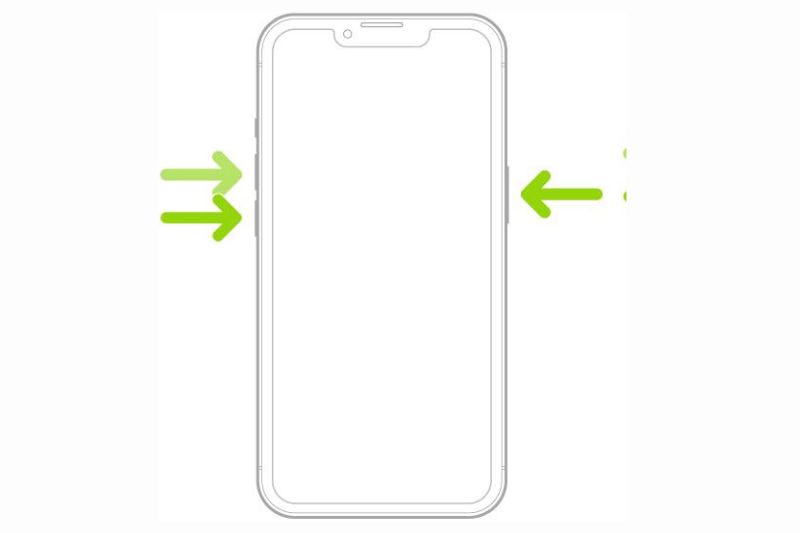
If your iPhone has Face ID (no home button), follow these steps:

Steps:

  1. Press and hold the Side button + Volume Up/Down button
  2. Wait until the Power Off slider appears
  3. Drag the slider to turn off the iPhone
  4. Wait 10–15 seconds
  5. Press and hold the Side button again to turn it back on

Also Read: How to Screen Record on iPhone

How to Restart iPhone (Home Button Models)
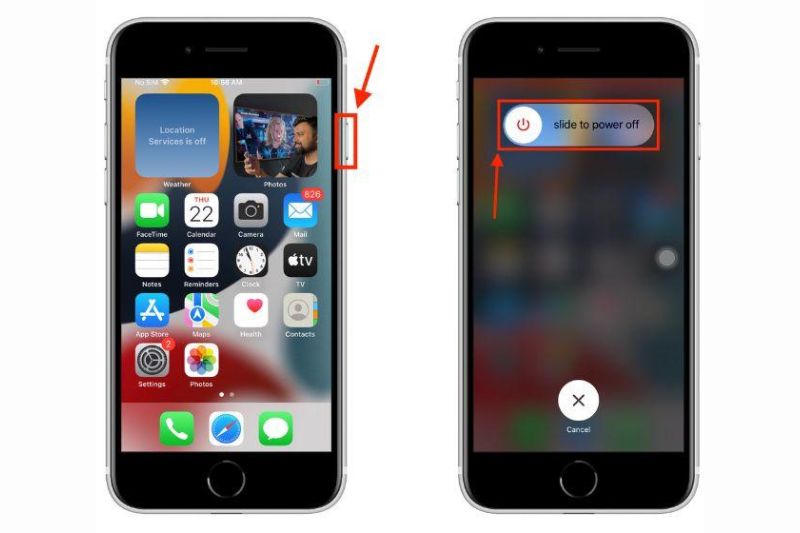
For older iPhones (iPhone 8, 7, SE, etc.):

Steps:

  1. Press and hold the Power button
  2. Wait for the slide to power off option
  3. Drag the slider
  4. After the device turns off, press the Power button again to restart

How to Force Restart iPhone (When It’s Frozen)
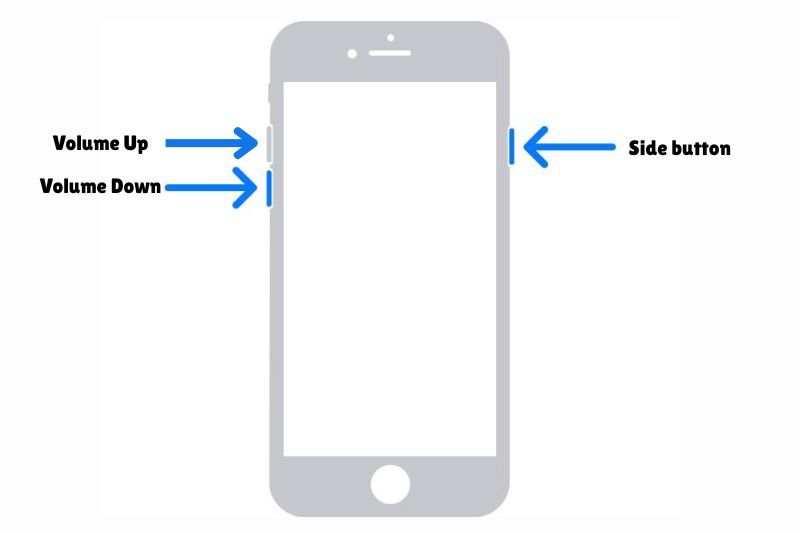
If your iPhone is not responding, a normal restart may not work. In that case, you need to force restart.

For iPhone 8 and newer:

  1. Press and quickly release Volume Up
  2. Press and quickly release Volume Down
  3. Press and hold the Side button
  4. Release when the Apple logo appears

👉 This method works instantly even if the screen is frozen.

Also Read: iPhone 18 Release Date in UAE

When Should You Restart Your iPhone?

You should restart your iPhone when:

  • Apps are crashing frequently
  • The device is slow or lagging
  • Internet or network issues occur
  • After software updates
  • Battery draining unusually fast

👉 Restarting regularly helps maintain performance.

iPhone Not Restarting? Try These Fixes

1. Buttons Not Working

  • Use AssistiveTouch (virtual button option in settings)

2. Screen Frozen Completely

  • Use Force Restart method

3. Stuck on Apple Logo

  • Try force restart again
  • If not fixed, restore via iTunes/Finder

Pro Tips for iPhone Users

  • Restart your iPhone once a week for smoother performance
  • Keep your iOS updated for fewer bugs
  • Avoid installing too many background apps
  • Use original chargers to maintain battery health

Restart vs Force Restart – What’s the Difference?

FeatureRestartForce Restart
MethodNormal shutdownButton combination
Use CaseRegular useFrozen iPhone
RiskNoneSafe if done correctly
Data LossNoNo

👉 Both methods are safe and do not delete your data.

Also Read: Upcoming Smartphones & Launches in UAE (2026)

FAQs – Restart iPhone

How often should I restart my iPhone?

Once a week is ideal for maintaining performance.

Will restarting delete my data?

No, restarting your iPhone does not remove any data.

What is the difference between restart and reset?

Restart simply reboots your phone, while reset erases data or settings.


Final Thoughts

Knowing how to restart iPhone is a basic but powerful skill that can fix most common issues instantly. Whether you’re using the latest iPhone or an older model, both normal restart and force restart methods are quick and safe.

👉 If your device is still facing issues after restarting, it may be time to explore upgrades like the upcoming iPhone 18 Series, which promises better performance and battery life.

iPhone iPhone 16 pro max iPhone 17 iPhone 18 Restart iPhone
Follow on Google News Follow on Flipboard
Share. Facebook Twitter Pinterest LinkedIn Tumblr Email
Previous ArticleHow to Screen Record on iPhone with Sound, Steps & Hidden Tricks
Next Article Is Pandora Real Silver? Quality, Purity & What You Should Know
Gulf News Nation Desk
  • Website

This article is authored by a verified professional contributor at GulfNewsNation.com and thoroughly reviewed by our Editorial Team in accordance with strict editorial standards. Our review process prioritizes accuracy, credibility, transparency, and responsible journalism to provide readers with reliable and trustworthy information.

Related Posts

Huawei Mate 80 Pro Just Launched – 50MP Camera, 120Hz Display & Massive Battery

May 6, 2026

Samsung Galaxy M35 5G High Performance 200MP Camera and 120Hz Display for Just AED1,000

April 15, 2026

How to Screen Record on iPhone with Sound, Steps & Hidden Tricks

April 7, 2026

iPhone 18 Release Date in UAE (2026): Price in Dubai & Key Features

April 6, 2026

Upcoming Smartphones & Launches in UAE (2026)

April 6, 2026

Infinix ‘300MP Camera’ Smartphone With 7500mAh Battery

February 6, 2026
Add A Comment
Leave A Reply Cancel Reply

GulfNewsNation

GulfNewsNation is a trusted UAE news platform delivering data-driven updates on gold prices, business trends, economy, and market insights.

UAE

  • News
  • Education
  • Emergencies
  • Government
  • Environment
  • Transport
  • Weather

Business

  • Finance
  • Economy
  • Auto
  • Aviation
  • Corporate
  • Markets
  • Property
  • Tech

Entertainment

  • Gaming
  • Movies
  • OTT
  • Music
  • Local Events
  • Things to do in the UAE

Lifestyle

  • Beauty
  • Fashion
  • Food
  • Health
  • Mental Health
  • Parenting
  • Travel

Sports

  • Cricket
  • Football
  • Golf
  • Horse Racing

About Us

Contact Us

Write for Us

Editorial Policy

Privacy Policy

Terms & Conditions

© GulfNewsNation. All Rights Reserved. Powered by GulfNewsNation | UAE Market & Gold News
GulfNewsNation

GulfNewsNation is a trusted UAE news platform delivering data-driven updates on gold prices, business trends, economy, and market insights.

UAE

Business

  • News
  • Education
  • Emergencies
  • Government
  • Environment
  • Transport
  • Weather
  • Finance
  • Economy
  • Auto
  • Aviation
  • Corporate
  • Markets
  • Property
  • Tech

Entertainment

Lifestyle

  • Gaming
  • Movies
  • OTT
  • Music
  • Local Events
  • Things to do in the UAE
  • Beauty
  • Fashion
  • Food
  • Health
  • Mental Health
  • Parenting

Sports

Quick Link

  • Cricket
  • Football
  • Golf
  • Horse Racing
  • About Us
  • Contact Us
  • Editorial Policy
  • Privacy Policy
  • Terms & Conditions
© GulfNewsNation. All Rights Reserved. Powered by GulfNewsNation | UAE Market & Gold News